Writing Meta Descriptions That Drive More Clicks
Share

Meta descriptions may not directly affect your page's position in Google search results, but they play a critical role in whether someone clicks your link—or scrolls past it.
When users scan search results, they’re not just looking at rankings. They’re comparing what each link offers. And that's where a compelling meta description can make all the difference.
This article will explain what meta descriptions are, why they matter, how to write them effectively, and how one movie blog boosted user engagement by simply updating their meta descriptions with strategic calls to action.
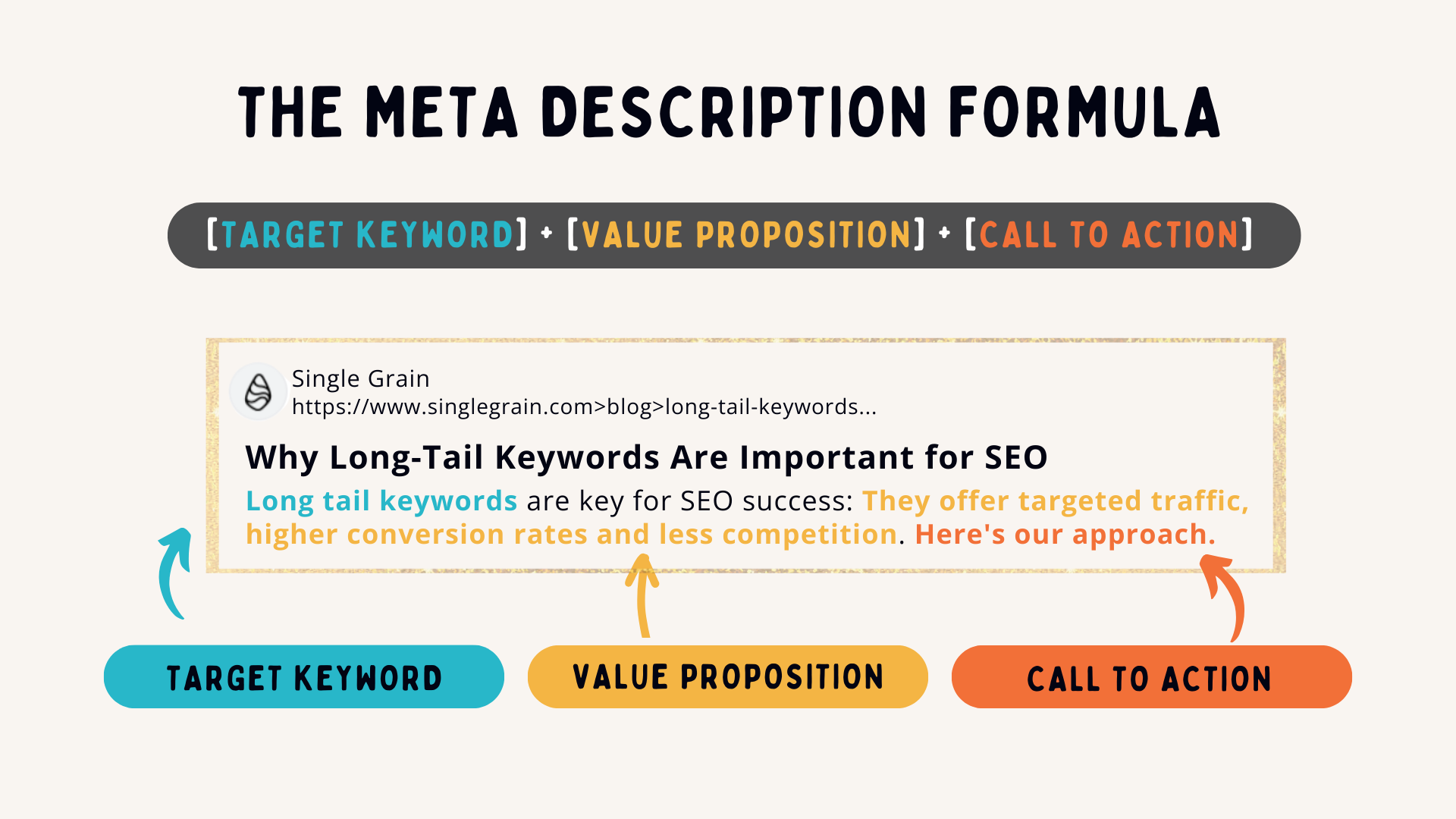
What Is a Meta Description?
A meta description is a short summary of a webpage's content that appears beneath the title in search engine results. It’s your opportunity to persuade users to click by explaining what they’ll get if they visit your page.
While Google doesn’t use meta descriptions as a direct ranking signal, it does use click-through rate (CTR) as part of its algorithm—and meta descriptions directly influence CTR.
Why Meta Descriptions Matter for SEO
Even if your page ranks in the top three, a weak or irrelevant description could mean users choose a lower-ranking result that looks more helpful or enticing.
A great meta description:
-
Draws attention in crowded search results
-
Explains value clearly and quickly
-
Encourages clicks through emotional or logical triggers
-
Aligns with the user’s search intent
Real Use Case: A Movie Blog Boosts Engagement with Better Descriptions
A popular movie review blog had strong rankings but struggled to keep users engaged once they landed on the site. The issue wasn’t the content—it was that users weren’t staying long enough to explore it.
What they noticed:
Their meta descriptions were bland or autogenerated, often just the first sentence of the article.
What they did:
They rewrote descriptions to include:
-
Clear benefits (e.g., “No Spoilers”)
-
Action-driven language (e.g., “Watch the Trailer Now”)
-
Keywords like “review,” “trailer,” and “cast breakdown”
Example before:
“We review the latest Marvel release with our take on the storyline and characters.”
Example after:
“No Spoilers – Honest Review of Marvel’s New Hit. Watch the Trailer and Meet the Cast.”
The result:
-
Higher click-through rates
-
Longer time spent on the site
-
More users interacted with trailers and comment sections
The takeaway? A small shift in how you describe your content can significantly impact how users engage with it.
How to Write a Meta Description That Gets Clicks
1. Stay Within the Character Limit
Keep your descriptions under 155–160 characters to ensure they appear in full on desktop and mobile.
Tip: Use tools like SERP preview simulators to test how your description looks before publishing.
2. Include the Target Keyword Naturally
Even though Google doesn’t count keywords in descriptions for rankings, it highlights them in bold when they match the search query—helping your result stand out.
Example:
“Discover the best skincare routine for dry skin. Tips, product reviews, and dermatologist advice.”
3. Match the User’s Search Intent
Think about what the searcher really wants. Are they looking for information? A product? A solution?
Tailor your message to that need.
Examples:
-
Informational: “Learn how to start a blog in 2024—perfect for beginners.”
-
Transactional: “Shop the latest laptops with fast shipping and 0% financing.”
-
Local: “Top-rated Thai restaurants in Bangkok—open late with delivery options.”
4. Highlight a Benefit or Unique Selling Point
Make it clear why someone should click your result over others.
Examples:
-
“100% Natural Ingredients”
-
“Updated for 2024”
-
“Free Download – No Signup Required”
-
“Backed by Science”
5. Use a Call-to-Action (CTA)
Encourage action with verbs like:
-
Discover
-
Try
-
Learn
-
Explore
-
Watch
-
Get Started
Example:
“No Spoilers – Read Our Honest Review & Watch the Official Trailer Now.”
6. Avoid Duplication Across Pages
Every page on your website should have a unique meta description. Duplicates reduce your visibility and confuse search engines.Use descriptions to tailor your message to the page’s specific focus.
7. Don’t Just Repeat the Title
Your meta description is a chance to expand on your title, not echo it.
Bad example:
Title: “Top 10 Healthy Smoothie Recipes”
Meta: “Top 10 Healthy Smoothie Recipes for Your Morning Routine”
Better example:
Meta: “Easy, delicious smoothies with under 5 ingredients—perfect for weight loss and busy mornings.”
Meta Description Examples by Industry
Blog/Content Marketing:
“Struggling to write blog posts that convert? Learn our 5-step strategy—no fluff.”
E-commerce Product Page:
“Lightweight running shoes with free shipping. Available in 5 colors and all sizes.”
Travel Website:
“Explore Thailand’s hidden beaches with our 7-day travel guide. Photos & itinerary included.”
Service Business:
“Affordable web design for startups. Get a custom site launched in 10 days or less.”
How to Review and Improve Your Meta Descriptions
-
Start with your top pages (Google Search Console > Performance > Pages)
-
Check if descriptions are missing, duplicated, or too generic
-
Rewrite them using the tips above
-
Monitor CTR and bounce rate changes after updates
Tools to Help You Craft Better Descriptions
-
Google Search Console – See CTR and impression data
-
Screaming Frog – Crawl your site and find missing or duplicate descriptions
-
Yoast SEO / Rank Math – Optimize meta fields in WordPress
-
SERPsim or Mangools SERP Simulator – Preview how your snippet appears on Google
Final Thoughts
Meta descriptions are like mini-ads for your content. When crafted strategically, they don’t just describe the page—they sell it.
If you’re looking to improve search visibility, drive more organic traffic, and keep users engaged, start by reviewing and refining your meta descriptions. It’s a quick win that can lead to big results.

Share

Keep me postedto follow product news, latest in technology, solutions, and updates
Related articles
Explore all