Accessibility in UX/UI: Designing for All Users
Share
Accessibility in UX/UI design is no longer an option—it is a necessity. Websites and applications should be usable by everyone, including individuals with disabilities. When digital experiences are designed with accessibility in mind, they become inclusive, user-friendly, and beneficial to a broader audience.
Despite its importance, many websites still lack essential accessibility features, leading to frustration and exclusion for users with disabilities. Poor accessibility can limit audience reach, reduce engagement, and even lead to legal consequences in some regions with strict digital accessibility laws.
This article explores the significance of accessibility in UX/UI, key principles of inclusive design, and how a university website improved accessibility with screen reader-friendly navigation, leading to a 40% increase in disabled student enrollments.
What Is Accessibility in UX/UI?
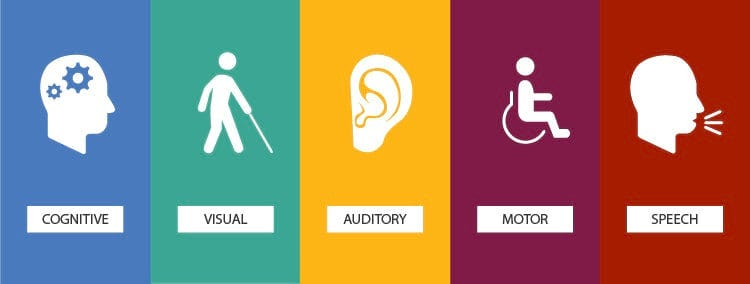
Accessibility in UX/UI refers to the practice of designing websites and applications so that all users, including those with disabilities, can access, understand, and interact with the content effectively. Disabilities that impact digital accessibility include:
-
Visual impairments (blindness, low vision, color blindness)
-
Hearing impairments (deafness, partial hearing loss)
-
Motor impairments (limited mobility, difficulty using a mouse or touchscreen)
-
Cognitive disabilities (dyslexia, ADHD, learning disorders)
A well-designed accessible interface removes barriers, ensuring that everyone can navigate and interact with digital products independently.
Why Accessibility Matters in UX/UI
1. Expands Audience Reach
By making websites accessible, businesses and institutions can serve a wider audience. An estimated 15% of the global population lives with a disability, according to the World Health Organization (WHO). When digital platforms fail to accommodate these users, they miss out on potential engagement, customers, and community members.
A website that supports screen readers, keyboard navigation, and text alternatives can engage more users who otherwise might be unable to access the content.
Example: An e-commerce website improved its accessibility features, allowing visually impaired users to complete purchases independently. This resulted in a 12% increase in sales from this demographic.
2. Improves User Experience for Everyone
Accessibility improvements benefit all users, not just those with disabilities. Features such as:
-
Clear navigation
-
Readable text with high contrast
-
Keyboard shortcuts
-
Captions for videos
…enhance usability for all visitors, including those in situational disabilities (e.g., using a phone in bright sunlight, watching videos in a noisy environment).
Example: A news website implemented adjustable text sizes and high-contrast mode, reducing bounce rates by 18%, as more users found it easier to read.
3. Legal and Compliance Considerations
Many countries have digital accessibility regulations, such as:
-
Americans with Disabilities Act (ADA) – Requires accessible digital experiences in the U.S.
-
Web Content Accessibility Guidelines (WCAG) – A global standard defining best practices.
-
European Accessibility Act (EAA) – Mandates accessibility for public and private sector websites.
Failure to comply with these regulations can lead to legal actions and financial penalties. Many organizations have faced lawsuits due to inaccessible websites, making accessibility a critical business consideration.
Example: A major retailer was sued for not providing accessible online shopping options. After redesigning its site, it avoided further legal issues and increased its customer base among visually impaired shoppers.
4. Strengthens Brand Reputation and Trust
Organizations that prioritize accessibility demonstrate a commitment to inclusivity and social responsibility. This enhances brand reputation, fosters loyalty, and attracts more users who value ethical business practices.
An accessible website signals that a company cares about all customers, regardless of their abilities, creating positive word-of-mouth and brand advocacy.
Example: A tech company launched an accessibility initiative, gaining positive media coverage and increasing its user base among disabled professionals by 25%.
Use Case: How a University Website Increased Disabled Student Enrollments by 40%
The Problem: Lack of Accessibility in Online Admissions
A university’s website was struggling with low enrollment numbers among students with disabilities. Upon review, the institution identified several barriers:
-
Navigation was not screen reader-friendly, making it difficult for visually impaired users to complete applications.
-
Online forms were not keyboard-navigable, limiting accessibility for users with motor disabilities.
-
Videos lacked captions, making it harder for deaf and hard-of-hearing students to access important information.
-
Color contrast was poor, making text difficult to read for users with low vision.
These issues discouraged disabled students from applying and negatively impacted the university’s commitment to inclusivity.
The Solution: Implementing Accessibility Features
The university took a comprehensive approach to accessibility, focusing on WCAG-compliant improvements:
-
Screen Reader-Friendly Navigation
-
Added ARIA (Accessible Rich Internet Applications) labels for menus and buttons.
-
Ensured that all links and interactive elements were clearly labeled for screen readers.
-
Keyboard-Accessible Forms and Interactions
-
Enabled tab-based navigation for all fields and buttons.
-
Simplified form fields, reducing unnecessary steps.
-
Closed Captions and Transcripts for Videos
-
Implemented automated captions for all educational and admissions videos.
-
Provided written transcripts for all multimedia content.
-
Improved Color Contrast and Text Readability
-
Adjusted the color scheme to meet WCAG’s recommended contrast ratio.
-
Added a "high contrast mode" for visually impaired users.
The Results: Increased Accessibility and Student Engagement
After implementing these changes, the university saw significant improvements:
-
40% increase in disabled student enrollments, as the application process became fully accessible.
-
30% increase in engagement time on the website, as more students could easily navigate content.
-
Higher student satisfaction, with positive feedback on the inclusive improvements.
These accessibility upgrades not only benefited disabled students but also enhanced the overall user experience for all applicants.
How to Implement Accessibility in UX/UI Design
1. Make Navigation Screen Reader-Friendly
-
Use ARIA labels to describe elements to assistive technologies.
-
Ensure that all menu items and buttons can be navigated using screen readers.
2. Enable Keyboard Accessibility
-
Allow users to navigate without a mouse (e.g., using the Tab key).
-
Ensure forms, dropdowns, and interactive elements are fully keyboard-accessible.
3. Improve Readability and Contrast
-
Use high-contrast color combinations for text and backgrounds.
-
Provide resizable text options for users with visual impairments.
4. Include Captions and Transcripts
-
Provide closed captions for all video content.
-
Offer text transcripts for podcasts and multimedia content.
5. Test for Accessibility Compliance
-
Use tools like WAVE (Web Accessibility Evaluation Tool) and Google Lighthouse to identify accessibility issues.
-
Conduct usability testing with disabled users to ensure real-world accessibility.
Conclusion
Accessibility in UX/UI design is not just about compliance—it’s about creating inclusive experiences that allow all users, regardless of ability, to interact with digital content effortlessly.
The university case study demonstrates how small changes, such as screen reader-friendly navigation, keyboard accessibility, and improved contrast, can lead to significant benefits, including a 40% increase in disabled student enrollments.
By prioritizing accessibility, businesses, educational institutions, and organizations can expand their reach, improve engagement, and strengthen their reputation. A truly great user experience is one that works for everyone.

Share

Keep me postedto follow product news, latest in technology, solutions, and updates
Related articles
Explore all